
CFB 27 Dynasty Points Explained: The Budget Game
Dynasty Blueprint turns CFB 27 dynasty mode into a budget game. Every season your program earns a pool of Dynasty Points, and every strategic move you make - hiring coordinators, upgrading facilities, landing recruits, keeping your stars - comes out of that one pot. The team that wins is not the one that recruits the hardest. It is the one that spends the smartest.
For the first time, dynasty has real opportunity cost. Every Dynasty Point you spend to land a five-star is a point you cannot spend to keep the star already on your roster. This guide breaks down where the points come from, where they go, and why a small-school rebuild is so much harder than the win-loss record makes it look.
The Short Version
TL;DR
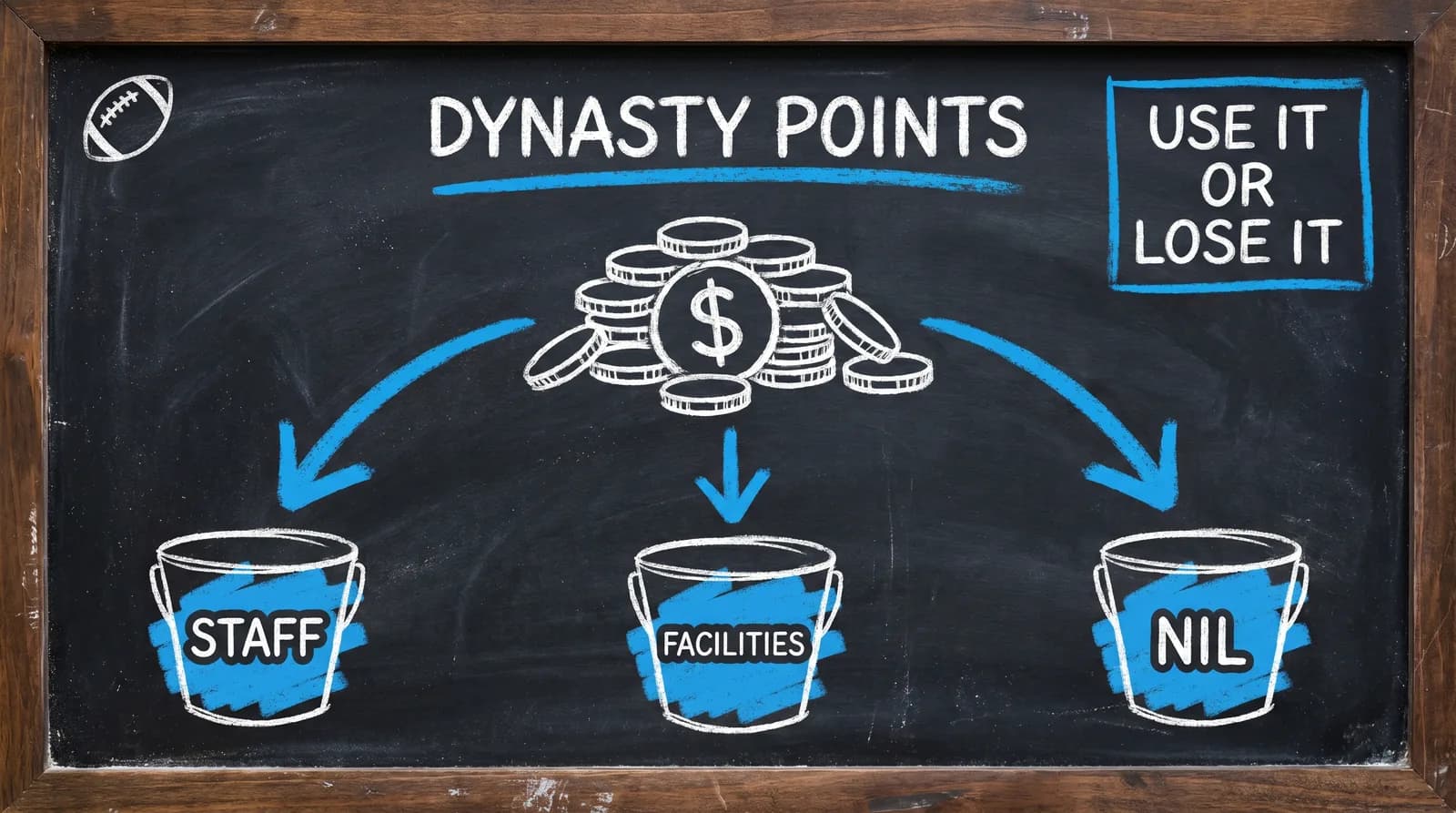
- Dynasty Points are your annual budget. They do NOT roll over - unspent points are lost at the End of Season Recap.
- Four income sources: school identity grades, postseason bonuses, AD goal bonuses, and annual fundraising.
- Three spending pillars: Coaching Staff, Facilities, and NIL. They all draw from the same pool.
- Blue-blood programs earn vastly more than G5 rebuilds, so the budget gap - not just the talent gap - is what makes rebuilding hard.
- The skill in CFB 27 is allocation. Even a mediocre spend beats letting points expire.
The single most important fact to internalize before your first season: hoarding never works. Points expire every year, so a suboptimal spend always beats an unspent point.
What Are Dynasty Points? The Mental Model
Dynasty Points are EA's abstraction for everything your program can invest in: coaching, infrastructure, and player compensation. They replace the old mental model of dynasty mode - recruit hard, sim, win, repeat - with a resource-management model borrowed straight from franchise modes.
In CFB 26 and earlier, your reach was effectively unlimited within recruiting rank caps. The meta was simple: chase five-stars. CFB 27 removes that certainty. You now have a fixed pool of Dynasty Points that refreshes each year, and unless you coach at a blue blood with a huge allotment, you cannot fund every priority at once. Most programs have to choose.
That is the whole shift. The question stops being how do I sign the best class and becomes where does my budget give me the best return. Once you think in those terms, every decision in the mode gets sharper.
How You Earn Dynasty Points: The Four Income Sources
Your budget is not a flat number. It is assembled from four income streams, and three of the four pay out at the End of Season Recap - which is also when unspent points disappear.
The Income Map
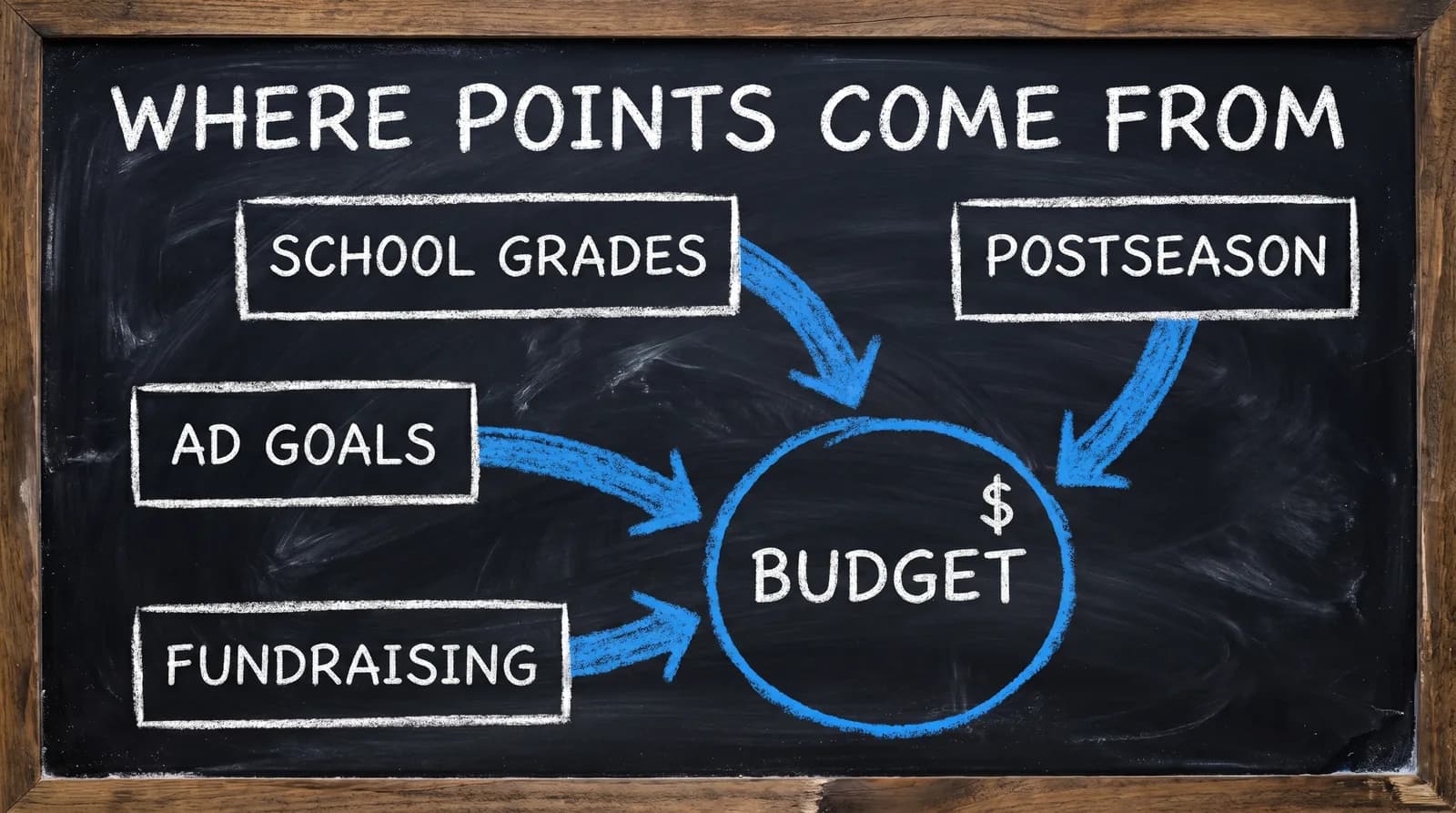
1. School Identity Grades (Your Base Budget)
Four school grades set the size of your starting pool each season. Higher grades mean a bigger base budget.
| Grade | What It Measures |
|---|---|
| Conference Prestige | Strength and reputation of your conference |
| Brand Exposure | Rolling five-year window of National Championships and Playoff appearances (new methodology in CFB 27) |
| Stadium Atmosphere | Home-field advantage and fan engagement |
| Program Tradition | Historical strength of the program |
These grades are not static. Sustained success raises them over multiple seasons, and sustained failure drags them down. Here is the small-school insight: a G5 rebuild starts with weak grades across all four categories. That is not just a worse team - it is a smaller budget for staff, facilities, and NIL all at once. In CFB 27, your grade sheet is the real difficulty slider.
2. Postseason Performance Bonuses
Bowl wins, conference championships, Playoff appearances, and a National Championship all pay bonus Dynasty Points at the End of Season Recap. These are the multipliers that let strong programs pull away: winning earns more points, which lets you spend more, which makes you win more. Breaking into that compounding loop is the core challenge of any rebuild.
3. AD Expectation Goal Bonuses
Your Athletic Director sets three goals per season, and each completed goal pays a bonus at the End of Season Recap. That makes your AD goals more than job-security theater - they are income events. Deliberately building your early seasons around goals you can actually complete is a budgeting move, not just career protection.
4. Annual Fundraising (Support Staff)
Certain support staff roles generate fundraising Dynasty Points each season. This is the one income source you control directly through spending. For a rebuild, support staff that both lowers your NIL costs and adds fundraising can pay for itself, which is why hiring staff first - before splurging on NIL - is often the highest-leverage move you can make.
The Three Spending Pillars: Where the Budget Goes
Every Dynasty Point you spend flows into one of three pillars. None of them has a ring-fenced budget - they all compete for the same pool.
Coaching Staff
Support staff are hired in the preseason only and locked for the year. You unlock one slot per prestige level, capped at five, and each hire comes in four tiers (Bronze, Silver, Gold, Platinum) with escalating cost and effect. Only one staffer of each type can be active at a time. The effects that matter most for rebuilds: cutting your players' NIL expectations, adding weekly recruiting hours, and speeding offseason progression.
Coordinators are hired during Bowl Season through the coaching carousel. Their cost scales with coach level and your school's prestige, and you can offer up to 2x a coach's expected value to boost interest. Free-agent coordinators cost zero points, so a cash-strapped rebuild can fill the staff for free and spend the savings elsewhere.
Facilities
Facilities run on a five-tier system, and your tier sets the ceiling on your Athletic Facilities grade and how many equipment slots you can use.
| Tier | Grade Ceiling | Equipment Slots |
|---|---|---|
| Basic | F | 1 |
| Competitive | D- to D+ | 2 |
| Premier | C- to C+ | 3 |
| Elite | B- to B+ | 4 |
| National Powerhouse | A- to A+ | 5 |
Upgrades take a full year and complete the next preseason, and you can only move up one tier per year. Higher tiers carry annual maintenance - skip the payment and the tier downgrades automatically. Facilities are the slow, compounding play: the move for a rebuild is to climb off Basic early so your grade ceiling stops capping your recruiting.
NIL (Recruiting and Roster)
NIL is now two-sided, and both halves draw from the same pool. Recruiting NIL is spent during the regular season to land prospects - deducted immediately when you make the offer, refunded if the recruit signs elsewhere. Roster NIL is spent at the End of Season Recap to keep the players you already have, each flagged with a departure-risk indicator.
Here is the tension that defines the mode: what you commit to landing recruits mid-season is unavailable when your breakout star's retention bill comes due at season's end. Overspend in the fall and you cannot keep your own roster in the winter.
Big School vs. Small School: The Budget Gap
This is the part that does not show up on the scoreboard. Dynasty Points scale with school prestige, so a blue blood and a G5 rebuild are not playing the same game - they are playing with wildly different bank accounts.
The Reported Range
Creator and beta reporting from before launch (not official EA figures - treat as illustrative) puts the gap in stark terms: a G5 program like Missouri State around 500 Dynasty Points per year, a blue blood like Ohio State around 20,000. One beta save reported roughly 15,000 available at Notre Dame in Year 2 with thousands left unspent after maxing NIL.
| School Tier | Annual Budget (illustrative) | Realistic Spend Capacity |
|---|---|---|
| Blue blood (P4 top) | ~15,000-20,000+ | Fund all three pillars aggressively |
| Power 4 mid-tier | Several thousand | Two pillars fully, one selectively |
| Power 4 low / G5 top | Low thousands | Pick one pillar per year |
| G5 rebuild | ~500 | Survive, not optimize |
What those numbers mean in practice: at 20,000 points you fund your staff, max your facilities, and spend aggressively on both NIL sides at once. At 500 points you make one meaningful choice all year and optimize within almost zero slack. A blue blood can have 30 to 40 times the budget of a program rebuilding from the bottom.
The Rebuild Playbook
If you are on a tight budget, spend in this order:
- Support staff that lowers NIL expectations first - it is a cost reducer and a fundraising generator at the same time.
- Targeted Recruiting NIL on two or three high-leverage prospects, not scattershot offers across the board.
- A facilities upgrade if anything is left, because it compounds into a bigger budget later.
- Fill coordinators with free agents (zero points) and reserve Roster NIL only for players who are genuine portal risks.
When to Spend What: The Calendar
You cannot spend your whole budget at once. Each pillar opens in a different phase of the season, which means timing mistakes are budget mistakes.
The Spending Calendar
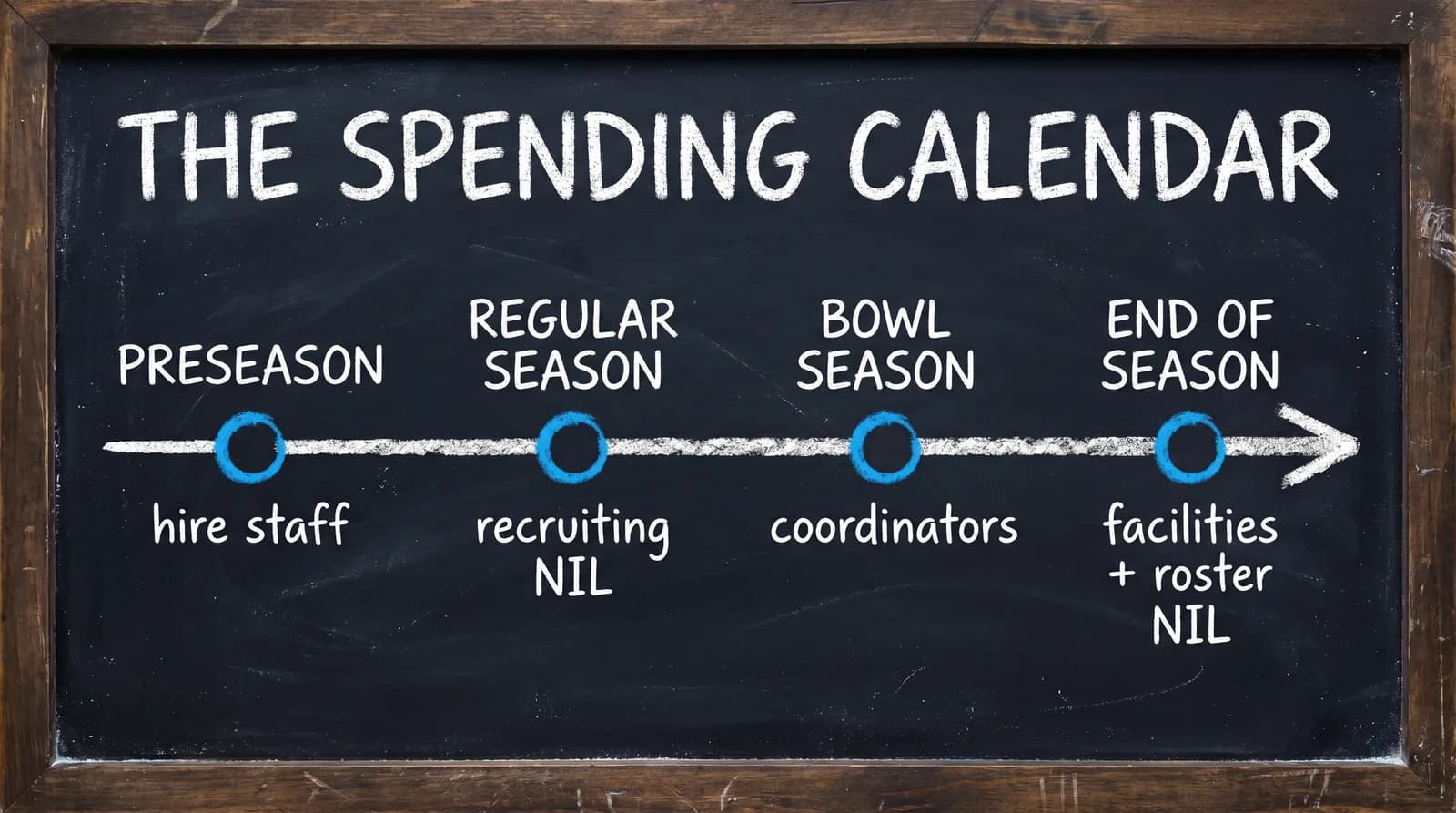
| Season Phase | Primary Actions |
|---|---|
| Preseason | Hire support staff, buy equipment upgrades |
| Regular season | Recruiting NIL offers, adjusted weekly |
| Bowl season | Coordinator carousel offers |
| End of Season Recap | Facility tier upgrades, Roster NIL, budget refresh, AD goal payouts |
The core timing risk: you commit Recruiting NIL during the regular season before you know what your Roster NIL bill will be at season's end. Overspend chasing recruits in the fall and you will not have enough left to keep your best returning players in the winter. Leave a buffer.
The One Rule That Changes Everything: Points Do Not Roll Over
This is the rule year-one players get wrong most often, so it deserves its own section. Unspent Dynasty Points vanish at the End of Season Recap. There is no carryover and no savings account.
The implication flips your instincts. Spending 300 points badly is always better than losing 300 points to expiration. If you find yourself sitting on a pile of points late in the offseason, you have already made a mistake - the question is only how to spend them with the least waste.
The spending hierarchy that follows from this: reduce costs first (staff that cuts your NIL floors), then invest in compounding returns (facilities and better grades that grow next year's budget), then make tactical NIL moves with whatever is left. And if you would rather not micromanage it, CFB 27 includes a Blueprint Strategy advisor and optional Auto Settings that let the CPU handle specific categories - though a rebuild operating on 500 points usually does not want the CPU making its few decisions.
Track Your Budget With Dynasty Central
The Dynasty Points system is a budget-allocation problem spread across three pillars, four spending windows, and several income events every season. Managing that by memory or a notes app is exactly the friction Dynasty Central removes.
Dynasty Central tracks your Dynasty Points budget, flags AD goal progress, surfaces your NIL spending across both sides, and shows multi-season trends so you can see whether your rebuild is actually gaining ground. Plan your points before kickoff, then track every save without spreadsheets.
Frequently Asked Questions
Do Dynasty Points roll over in CFB 27?
No. Dynasty Points expire at the End of Season Recap. Whatever you do not spend is gone - the system is use-it-or-lose-it every year. Spend deliberately, but always spend.
How do you earn Dynasty Points in CFB 27?
From four sources: your school's grades (Conference Prestige, Brand Exposure, Stadium Atmosphere, Program Tradition); postseason bonuses (bowl wins, Playoff appearances, championships); completed AD Expectation goals; and annual fundraising from support staff. Stronger programs earn proportionally more across all four.
How many Dynasty Points do you start with in CFB 27?
It depends on your school's grades. Pre-launch creator and beta reporting suggests blue bloods earn somewhere around 15,000 to 20,000 per year while G5 rebuilds may sit near 500. EA did not publish official figures before launch, so treat those numbers as illustrative.
What do you spend Dynasty Points on in CFB 27?
Three pillars: coaching staff (support staff in the preseason and coordinators in bowl season), facilities (five upgrade tiers plus equipment), and NIL (recruiting NIL during the season and roster NIL at season's end). All three draw from the same pool.
Why are small-school rebuilds harder in CFB 27?
Because Dynasty Points scale with school prestige grades, and G5 programs start with weak grades across the board. A blue blood may have 30 to 40 times the budget of a rebuilding G5, so you are competing on a fraction of the resources for staff, facilities, and NIL at once.
How do I get more Dynasty Points in CFB 27?
Win more. Postseason results pay bonus points at the End of Season Recap, completing your AD's three goals pays bonuses, and certain support staff generate annual fundraising. Improving your school's grades over multiple seasons also raises your base budget.
What happens if you do not spend all your Dynasty Points?
They expire. Points do not carry over - anything unspent at the End of Season Recap is lost. A bad spend is always better than no spend.